How AWS Lambda Earns 5x More Than EC2: A System Software Perspective
Back when I was building at an early-stage startup, I used AWS Lambda constantly. The appeal was obvious: almost no infrastructure management, and you only pay for what you actually run. We processed tens of thousands of requests a month and the bill never broke the cost of a few cups of coffee. At the time, I had a vague, nagging thought: “Is AWS even making money off this?”
Now, deep into graduate school studying OS, virtualization, and kernel internals, I revisited that question with a financial lens—and the answer is striking. AWS Lambda isn’t just cheap for users; it’s actually a significantly higher-margin product for AWS compared to EC2.
How is this “win-win” possible? The answer lies in two things: Utilization (average resource usage) and a virtualization technology called Firecracker.
1. The Core of the Profit: “Reselling Idle CPUs” Link to heading
Cloud providers make money from one thing: how many customers’ workloads they can run on the same hardware.
The traditional EC2 (Virtual Machine) model leases specific cores and memory to a customer. Take a server with 128 physical cores and 256 threads. Each thread maps to one vCPU, so you can create up to 256 EC2 instances—one per thread, one customer per slot.
This gets more nuanced with overprovisioning in practice, but for simplicity, let’s assume a dedicated model: 1 vCPU = 1 EC2 instance.
The problem is that customers don’t use 100% of what they lease. CAST AI’s research found that average CPU utilization across provisioned instances is just 13%. Flipped around, that means the CPU sits idle for roughly 20 out of every 24 hours.
So here’s the question: what if instead of leasing 1 vCPU to 1 customer, you could have dozens or hundreds of customers take turns on that vCPU? Instead of 256 customers, you serve tens of thousands. In the rental car world, you can’t lend the same car to two people at once. But in software, virtualization lets you reclaim and reassign resources at sub-second granularity, pushing utilization—and profitability—to the extreme. This is exactly the model serverless is built on.
Rather than leaving it at theory, let’s look at AWS’s actual pricing to see how idle time translates into real revenue.
Revenue Comparison: EC2 vs Lambda Link to heading
Let’s compare what AWS earns from selling “1 GB of memory” for one hour under each model.
| Metric | EC2 (t4g.micro) | Lambda (1 GB allocation) |
|---|---|---|
| Fixed hourly rate | $0.0104 | $0.00 (zero if no invocations) |
| 1-hour full utilization (duration) | $0.0104 | $0.0600 ($0.0000166667 × 3600s) |
| Per-request charges (variable) | $0.00 (unlimited) | +$0.0007 ~ $0.0720 |
| Total revenue (AWS perspective) | $0.0104 | ~$0.0607 ~ $0.1320 |
Running the same resource at full capacity for one hour, Lambda generates about 5.7x the revenue of EC2. And if the workloads are short enough that more requests fit within the same hour, Lambda can reach up to 12x the margin compared to EC2.
From the customer’s side, this doesn’t feel like overpaying—because they’re only billed for actual execution. Meanwhile, the customer who leased an EC2 instance was already “losing” by utilizing just 13% of what they paid for.
2. The Technical Challenge: “Denser and Faster” Link to heading
Realizing this shared-economy model comes with demanding technical requirements. Running thousands of customers’ code on a single server requires three things to be airtight:
- Isolation: One customer’s code must never access another’s data or compromise the host system (security).
- Minimal overhead: If the virtualization layer is too heavy, the gains from sharing evaporate.
- Fast provisioning: Execution must start the moment a request arrives—cold starts are unacceptable.
Existing technologies each fall short in one way or another.
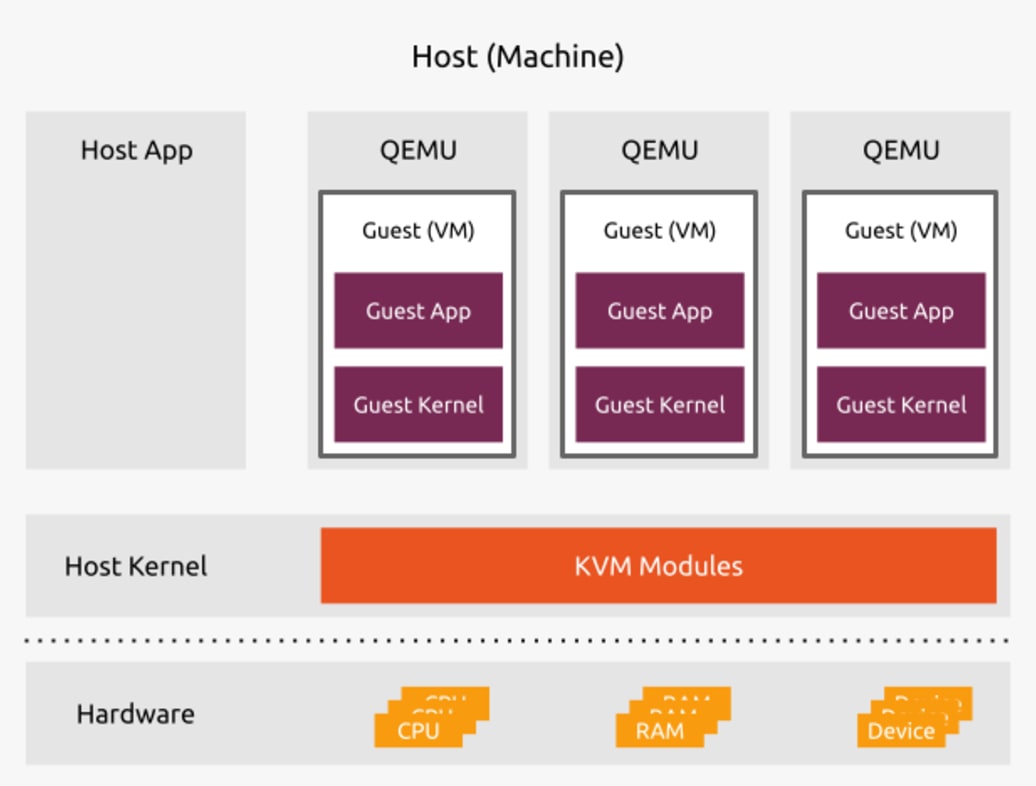 Source: Ubuntu Official Blog
QEMU-based VMs with KVM: KVM (Kernel-based Virtual Machine) turns the Linux kernel into a hypervisor and uses hardware acceleration (VT-x) for fast context switching between VMs. But the bottleneck is QEMU’s device emulation—BIOS, disk, network cards. On top of that, each VM must boot a full independent kernel, which takes seconds to tens of seconds. Fine for EC2, fatal for short-lived Lambda functions.
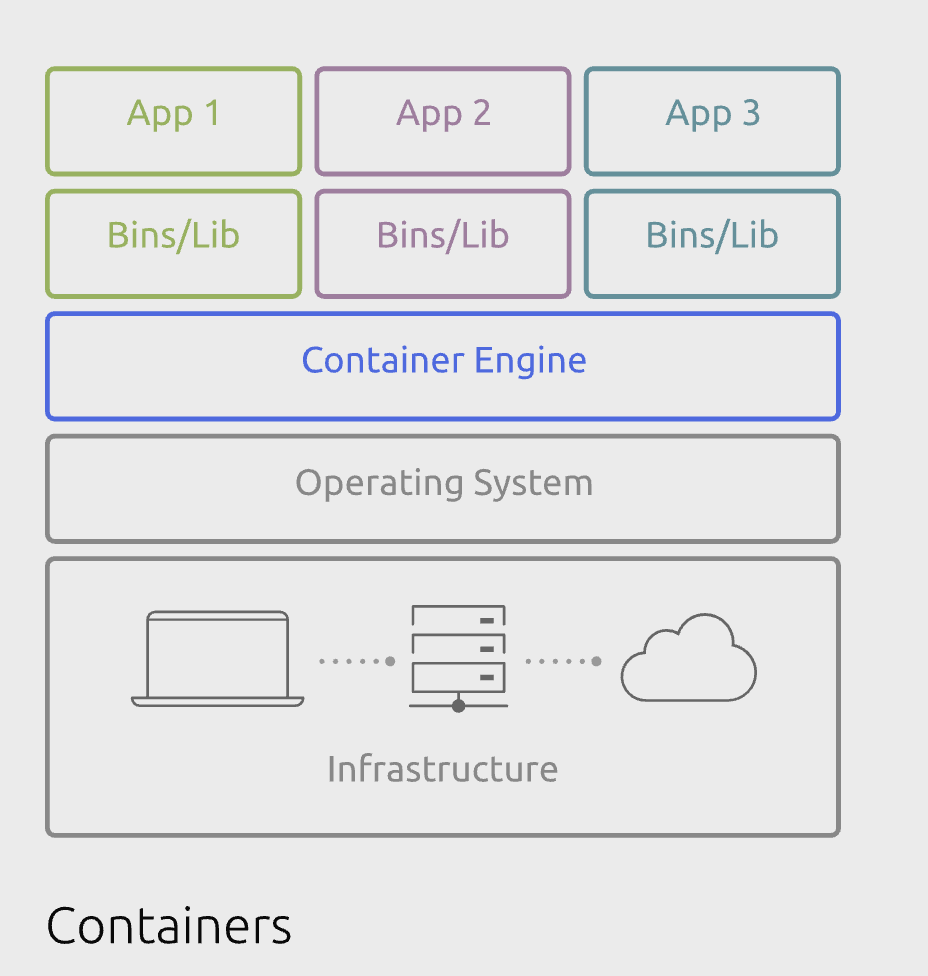
Containers (Docker, etc.): Containers use Linux Namespaces (isolation) and Cgroups (resource limits) for process-level virtualization. No separate kernel boot means startup is near-instant. But that shared kernel is also the weakness—if a container escapes via a kernel vulnerability, every other customer on the same host is exposed. In a multi-tenant public cloud, that’s an unacceptable risk.
3. The Answer: MicroVM, “Firecracker” Link to heading
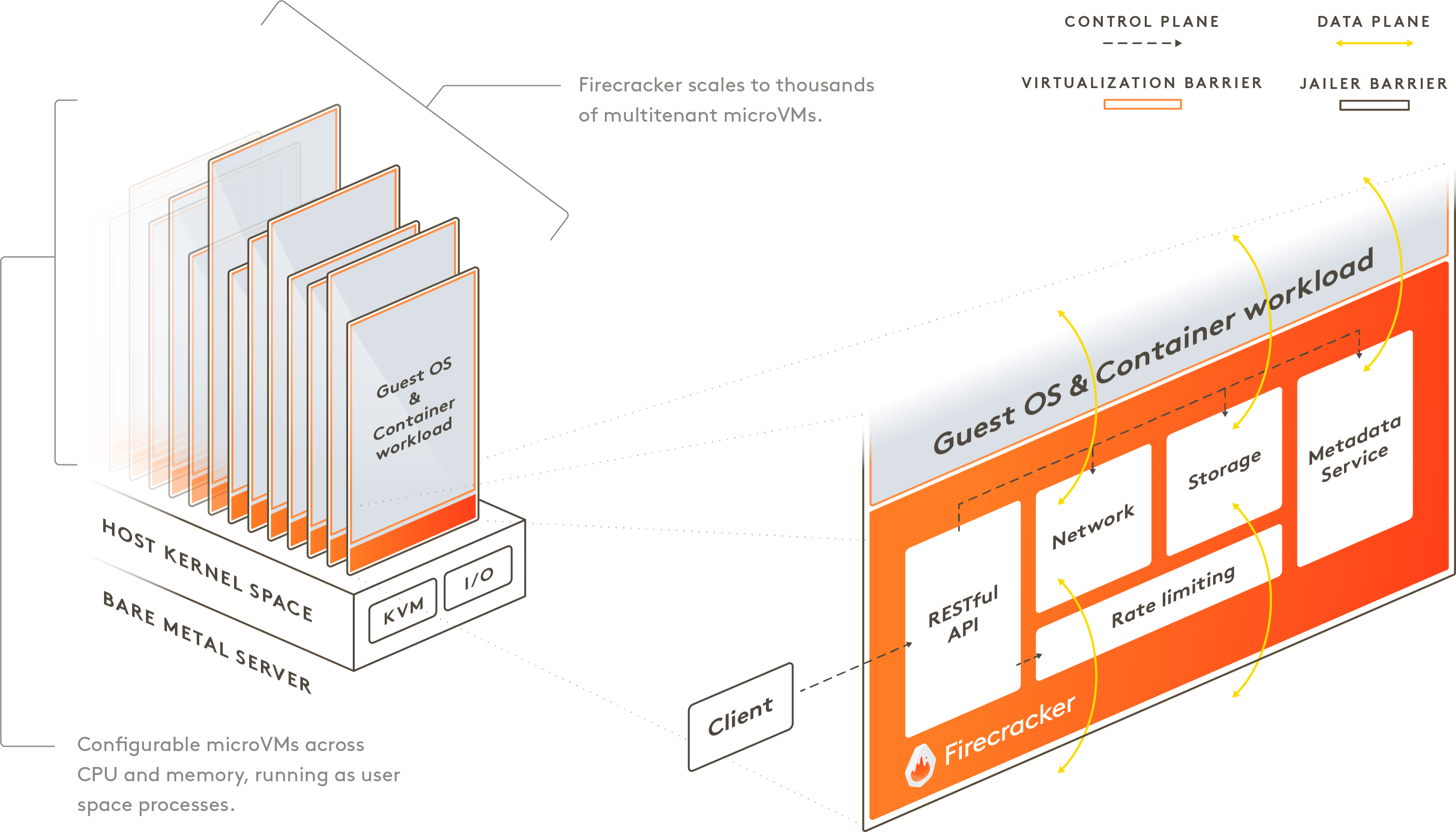 Source: https://firecracker-microvm.github.io/
AWS built Firecracker to bridge this gap.
Like QEMU, Firecracker is KVM-based—but it strips away everything unnecessary: legacy keyboard controllers, video cards, and any other emulated device that Lambda doesn’t need. What’s left is an extremely lightweight virtualization layer with only the essentials.
| Feature | QEMU (Traditional VM) | Container | Firecracker (MicroVM) |
|---|---|---|---|
| Isolation level | Very high (hardware-level) | Low (shared OS) | High (MicroVM-level) |
| Boot time | Seconds to minutes | Milliseconds | Under 125ms |
| Memory overhead | Hundreds of MB+ | Minimal | ~5 MB or less |
In practice, Firecracker boots a Linux kernel in under 125 milliseconds. That means thousands of independent virtual machines can be spun up per second. This is the technical foundation that makes “allocate CPU only when a request arrives, then immediately reclaim it” actually work at scale—the engine behind Lambda’s utilization maximization.
Conclusion: Serverless Through a Systems Engineer’s Lens Link to heading
AWS Lambda’s success is the result of answering a business question—“how do we minimize idle resources?"—with a systems engineering answer: “ultralight virtualization through MicroVMs.”
Users get operational simplicity. The cloud provider gets extreme resource efficiency and higher margins. And behind this seemingly magical arrangement lies the craft of pushing Linux kernel and virtualization technology to their absolute limits.
Which raises another question. In this post, I assumed “1 vCPU = 1 physical core” for simplicity—but is a VM really the same as a physical server? Is a vCPU truly yours? And what actually goes wrong when providers overprovision? In the next post, I dig deeper into that structure.