Is a VM Really a Server?
When you spin up a VM in the cloud, you treat it like a dedicated server. Pick 2 vCPUs, allocate some memory, and within seconds a full Linux machine is waiting for your SSH connection. It has a filesystem, running processes, and CPU utilization metrics. From the outside, it looks no different from a physical server.
But what is actually happening inside that VM? And are those 2 vCPUs and 4 GB of memory truly yours?
The short answer: a VM is not a physical server. A VM is a set of processes running on top of a host Linux kernel, and your VM competes with other customers’ VMs for the same physical CPU cores. This means your VM’s execution can be delayed beyond expectations—even a simple 10ms sleep can drift by 30ms or more.
This post traces that structure step by step:
- What a VM actually is — the reality behind vCPUs
- Why cloud providers are incentivized to overprovision
- The chain reaction that follows: steal time, scheduling latency, and timer drift
- Why this matters from a real-time systems perspective
Let’s start from the bottom.
What a VM Really Is: Not a Server, but a Process Link to heading
To understand how VMs work, you first need to look at the hypervisor. Most cloud environments today, including AWS, run VMs on top of KVM (Kernel-based Virtual Machine). KVM turns the Linux kernel itself into a hypervisor. A host Linux system loads the KVM module, and multiple guest VMs run on top of it simultaneously.
Now go one layer deeper. The 2 vCPUs you selected in the console are not 2 physical CPU cores. In KVM, each vCPU is represented as a thread from the host OS’s perspective. When your VM’s vCPU performs computation, what actually happens is that the host Linux scheduler places that thread onto a physical core and lets it run for a slice of time.
This immediately raises the next question. What if the host is busy? What if other VMs are demanding CPU at the same time? What happens to your VM then?
Why Cloud Providers Can Sell More vCPUs Than Physical Cores Link to heading
Suppose a physical server has 64 cores. If the cloud provider places only 32 VMs with 2 vCPUs each, vCPU count matches physical cores exactly. But real-world operations are never that clean.
Most VMs don’t use 100% of their CPU all the time. Web servers sit idle when there are no requests. Batch jobs spike only during specific time windows. Cloud providers exploit this statistical behavior to sell more vCPUs than there are physical cores. Allocating 128 or more vCPUs on a 64-core server is not unusual. This is overprovisioning, and as I discussed in a previous post, the more aggressively a provider overprovisions, the more revenue they can extract from the same physical hardware.
Under normal conditions, this works fine. But when multiple VMs on the same physical server start consuming CPU heavily at the same time, the host scheduler must rotate limited physical cores across many vCPU threads. That’s when the “why is my VM slow?” phenomenon begins.
The graph below shows steal time measured over 10 hours on Vultr and AWS.
Vultr is a mid-tier cloud provider that offers EC2-like VMs at lower prices than AWS.
Steal time is explained in detail below, but for now, think of it as time your VM lost to the host.
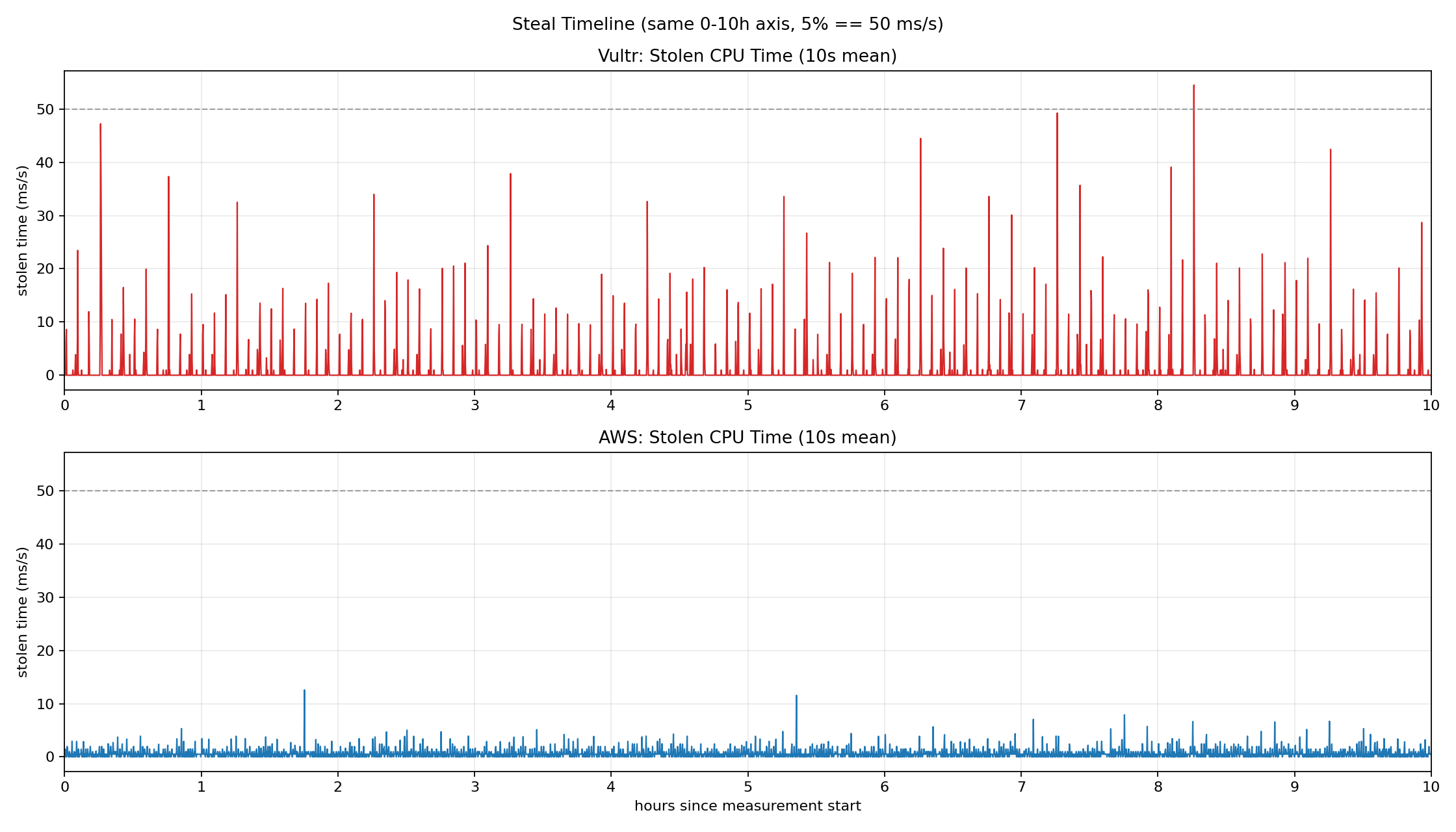
Vultr (red) frequently exceeds 20–40 ms/s of steal time, with peaks approaching or surpassing the 50 ms/s mark (5%). AWS (blue), as the market leader, keeps steal time relatively low, but intermittent spikes above 10 ms/s still appear. In neither environment is steal time pinned at zero, and the timing of these spikes is unpredictable.
What Actually Happens in Practice Link to heading
Let’s return to the 10ms sleep from the introduction. Why can’t even a simple wait be honored precisely?
The effects of overprovisioning manifest in two stages. These are not independent phenomena—they form a single causal chain.
Stage 1: Steal Time — Losing Your CPU

Run top and you’ll see %st among the CPU usage categories. That’s steal time: the percentage of time your VM wanted to use the CPU but had to wait because the host allocated the physical core to another VM.
For example, if 50ms of steal time is recorded over one second, your vCPU sat completely idle for those 50ms. From your application’s perspective, it didn’t “slow down”—it simply never got a chance to run.
Stage 2: Timer Precision — Time Itself Becomes Unreliable
This connects directly to timer accuracy. Linux handles scheduling and sleep through periodic timer interrupts. But these interrupts can only be processed normally when the vCPU is actually executing on a physical core.
During steal time windows, timer interrupt handling itself is delayed. As a result, even though you requested a 10ms sleep via clock_nanosleep, the process wakes up much later than expected. Below is a directly measured timer drift graph.
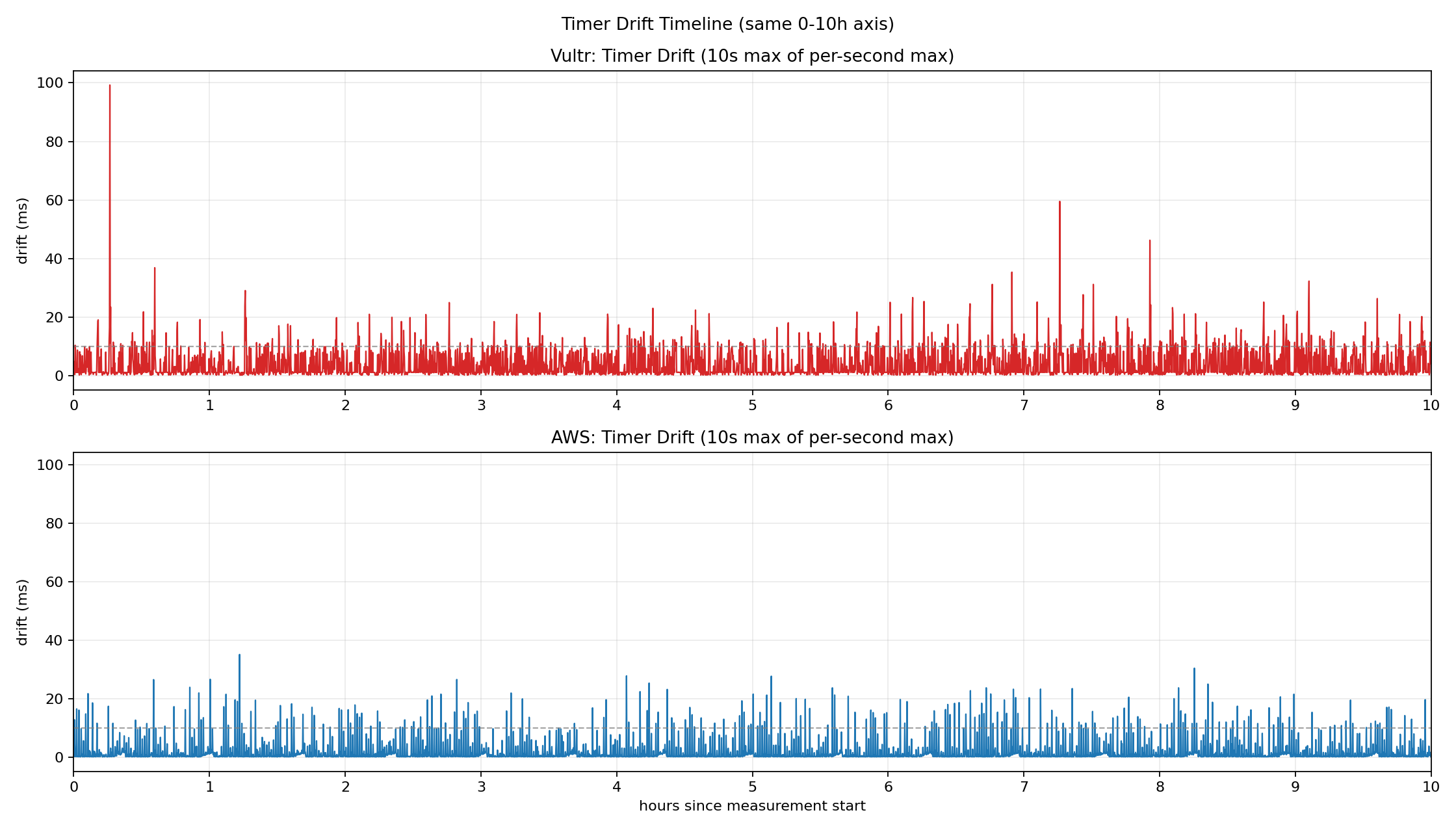
Vultr (red) maintains a baseline drift around 10ms, with peaks approaching 100ms. AWS (blue) is relatively stable but still shows intermittent spikes exceeding 30ms.
The chain reaction looks like this:
Overprovisioning → steal time → timer interrupt delay → scheduling delay inside the guest
The moment your application actually executes is variable, and there is no way to fully control it from inside the VM.
Does an Occasional 30ms Delay Really Matter? Link to heading
One question remains. Is an occasional 30ms delay really that significant?
For most web services and general server workloads, the answer is no. Users don’t notice if an API response is a few tens of milliseconds late. From an operations perspective, this kind of variance often gets buried in monitoring noise. As long as it stays within SLA bounds, it’s not considered a problem.
But the picture changes as software increasingly interfaces directly with the physical world. Imagine performing remote robotic surgery. If control signals are delayed by tens of milliseconds, that’s not a performance degradation—it’s a potential accident. The same applies to vehicle control, aviation systems, and any domain where timing constraints are fundamental.
Systems where “when it runs” matters less than “by when it must run” are called real-time systems. Historically studied in automotive, aerospace, and industrial control domains, real-time requirements are now becoming critical in cloud-native contexts too: 5G core networks, telco clouds, and high-frequency trading (HFT).
Linux offers several facilities to support these demands. Real-time schedulers like SCHED_FIFO, SCHED_RR, and SCHED_DEADLINE exist, and the recent mainlining of the PREEMPT_RT patch enables finer-grained control over preemption points within the kernel.
The problem is that even with these schedulers running inside a VM, the overprovisioning structure described above imposes a fundamental ceiling. No matter how high a priority you assign inside the guest, if the host doesn’t schedule your vCPU, execution simply cannot happen. Real-time policies can govern competition inside the guest, but they cannot control competition at the host level.
Companies with such sensitive requirements already use bare metal instances or dedicated CPU instances as an architectural countermeasure. But even for personal projects, understanding this structural limitation is essential if you’re designing a system where timing constraints matter.
This brings us naturally to the conclusion.
Closing: Understand the Structure, Then Choose Link to heading
What we’ve covered in this post is not a performance tuning story. It’s a structural walkthrough of how VMs execute, what vCPUs actually are, and what chain effects overprovisioning produces.
For web servers and typical backend workloads, this non-determinism may not be a critical issue. But in domains where timing is central to the design—5G infrastructure, telco clouds, high-frequency trading, and control systems—this difference changes the fundamental character of the system.
The takeaway is not “the cloud is slow.” It’s that the cloud runs on shared resources, and your architecture must account for that fact. Non-determinism on a VM is not a bug—it’s a structural property.
In some domains, you can accept this property. In others, you need to rethink your architecture from the ground up.
That choice becomes possible only after you understand the structure.